Best CCTV Camera for Outdoor and Indoor Use Explained
November 23, 2026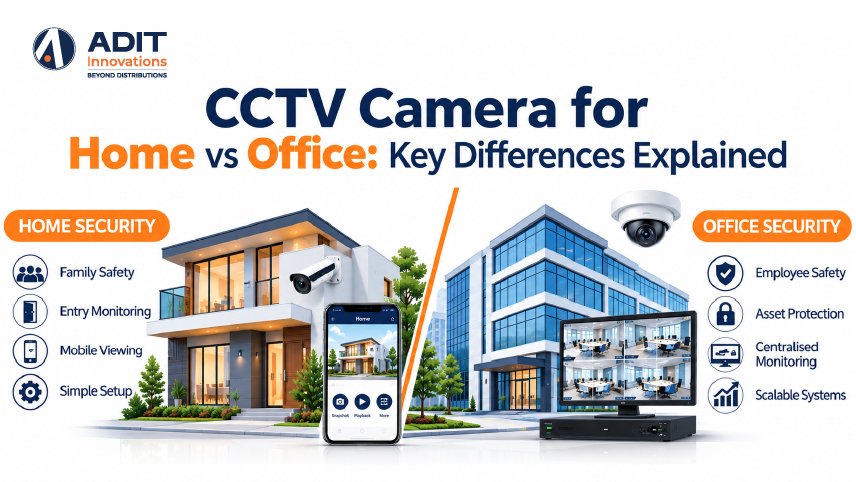
Why Home and Office CCTV Needs Differ
CCTV cameras use the same core technology in residential and commercial settings, but selection, placement, and management depend on the property’s needs.
A home typically needs monitoring for entrances, deliveries, parking areas, and family safety. An office requires broader coverage, visitor monitoring, asset protection, and reliable records for incident investigation. These differences influence camera selection, resolution, storage capacity, network infrastructure and access permissions.
A small home may run efficiently with a few cameras connected to a compact recorder or a mobile app. An office may need a larger IP camera system with centralized recording, multiple viewing users, and room for future expansion.
The Adit Innovations team prepared this guide to explain these differences in simple terms and help property owners make informed decisions before planning an installation.
Home vs Office at a Glance
| Area | Home | Office |
| Main purpose | Entry monitoring and family safety | Employee safety, visitor monitoring and asset protection |
| Typical camera count | 2 to 8 | 6 to 24 or more |
| Common camera types | Bullet, dome and wireless cameras | Dome, turret, bullet, fisheye and PTZ |
| Typical resolution | 2 MP to 4 MP | 4 MP to 8 MP |
| Recording equipment | 4 or 8-channel recorders | 16 or 32-channel recorders |
| Storage requirements | Based on camera count and retention period | Based on camera count, retention policy, and operational needs |
| Viewing method | Mobile application | Video management software with user permissions |
| Network | Home router or compact PoE switch | Managed switches and structured cabling |
| Integration | Doorbells and smart home devices | Access control and other business security systems |
| Privacy focus | Family members and neighbors | Employees, visitors and organizational policies |
These figures are general planning ranges. The final requirements depend on the property layout, security objectives, and recording needs.
Purpose and Risk Profile
A home CCTV camera system generally focuses on entry points and the property’s immediate surroundings. The main gate, front door, rear entrance, driveway, and boundary walls are common monitoring locations. Homeowners often prefer simple mobile access, motion alerts, and convenient playback.
An office has a wider range of security requirements. Reception areas, entry doors, corridors, server rooms, inventory storage, billing counters, and parking facilities may each need dedicated coverage. Several authorized users may need to review recordings, making user permissions and reliable storage important.
Example. A homeowner may want to check whether a delivery arrived while they were away. An office manager may need to investigate an incident by reviewing the entrance footage and identifying the time a visitor entered the building. The first requirement may be met by a camera with mobile alerts, while the second benefits from searchable recordings and a structured surveillance system.
Understanding the purpose of each camera helps prevent unnecessary installations and ensures that important areas receive adequate coverage.
Camera Types and Placement
Camera selection should follow the location, viewing distance, and level of detail required.
Homes
Bullet cameras are suitable for gates, driveways and outdoor boundaries because they can provide focused views of entry points. Compact dome cameras work well in hallways, staircases and other indoor spaces.
A wireless security camera can be useful in rented properties or rooms where installing network cables is difficult. However, it still requires reliable power and a stable wireless connection.
For a typical home, camera placement should prioritise entrances, blind spots and frequently used access routes rather than simply covering every room.
Offices
Dome and turret cameras are commonly used in reception areas, corridors and workspaces. Bullet cameras suit parking entrances and building exteriors. Fisheye cameras can cover larger open areas, while pan-tilt-zoom cameras may help monitor expansive parking facilities or outdoor yards.
A security camera for office environments should be selected according to the function of each space. A reception camera may need clear facial detail, while a warehouse camera may prioritise wide coverage and monitoring of stock movement.
An IP CCTV camera system can combine different compatible camera types within a shared network and recording platform.
Our comparison of dome, bullet and PTZ cameras explains these options in more detail.
Resolution and Image Detail
Resolution determines how much image detail a camera can capture. However, a higher megapixel rating does not automatically guarantee better identification. Lens selection, viewing distance, lighting, camera positioning and compression settings also affect image quality.
Pixel density provides a useful way to estimate the details available across a scene. For planning purposes, approximately 250 pixels per metre is a useful reference for identification, although the actual requirement depends on the application.
| Camera resolution | Horizontal pixels | Approximate scene width at 250 pixels per metre |
| 2 MP | 1920 | 7.7 metres |
| 4 MP | 2560 | 10.2 metres |
| 8 MP, 4K | 3840 | 15.4 metres |
A narrow home entrance may be adequately covered by a 2 MP or 4 MP camera. A wide office lobby or vehicle entrance may benefit from a 4 MP or 4K IP camera, depending on the required level of detail.
Example. If an office entrance is approximately 12 meters wide and the objective is to identify people entering, one 4 MP camera may not provide sufficient identification detail across the entire scene. A 4K camera or two strategically positioned cameras may be more appropriate.
Higher resolution also increases bandwidth and storage requirements. The best choice balances image detail, recording capacity, and budget.
Lighting and Night Imaging
Lighting conditions directly influence surveillance performance.
Homes often require night monitoring at gates, driveways and boundary walls. Infrared illumination supports black-and-white recording in darkness, while suitable low-light technology or integrated white light can help capture colour information.
Offices may experience challenging lighting at glass entrances, reception areas and parking facilities. Wide Dynamic Range, commonly known as WDR, helps balance bright and dark areas within the same image.
Camera positioning is equally important. Poor angles, reflective surfaces, and direct light sources can reduce image clarity even when the camera has a high resolution.
When comparing CCTV camera models, review night vision performance, WDR capability, and the intended operating environment instead of relying on resolution alone.
Recorder, Storage and Retention
Recording equipment should match the camera count, image quality, recording schedule, and required retention period.
Home systems commonly use four- or eight-channel recorders. Offices with more cameras may require a 16 or 32-channel Network Video Recorder, depending on the planned installation.
An NVR system with a 16-channel configuration can suit an office with approximately 12 to 14 cameras while leaving some channels available for future additions.
Storage requirements can be estimated using the following formula.
Daily storage in GB = Total recording bitrate in Mbps × 10.8
This estimate assumes continuous recording and does not include all overheads or variations in recording settings.
Example for a home. Four cameras recording at approximately 2 Mbps each generate about 86.4 GB per day. Thirty days of continuous recording require approximately 2.6 TB before allowing additional capacity.
Example for an office. Sixteen cameras recording at approximately 2 Mbps each generate about 345.6 GB per day. Thirty days require approximately 10.4 TB before additional capacity allowances.
H.265 compression can reduce storage consumption compared with H.264 at comparable image quality. Motion-based recording may also reduce storage use in suitable locations.
For larger installations, appropriate rack space, ventilation, cable management and backup power help maintain dependable recording. Storage should be selected according to the organization’s retention policy and operational requirements.
Network, Power and Scalability
Both homes and offices can benefit from an IP camera system, but their network requirements differ.
Home network requirements
A small installation may use a home router and a compact Power over Ethernet switch or an NVR with integrated PoE ports. A wireless camera may reduce cabling requirements where a reliable connection is available.
Office network requirements
An office generally benefits from managed PoE switches, structured cabling, adequate power capacity and a separate network segment for surveillance equipment.
Standard Ethernet cable runs are typically limited to 100 meters per channel. Longer distances may require suitable network design solutions, depending on the equipment and site layout.
Cable quality, switch capacity and recorder compatibility should be checked before installation. The network should support the combined bandwidth of all cameras without creating unnecessary congestion.
Scalability is another important consideration. An office expecting to add cameras should plan spare recorder channels, network ports, power capacity, and cable routes. This reduces the need for expensive modifications as the business grows.
Our guide to IP cameras versus analog cameras explains the main differences between these technologies.
Privacy and Data Responsibility
Privacy considerations apply to both homes and offices.
At home, cameras should be positioned to monitor the property without unnecessarily recording neighbouring homes or private spaces. Indoor cameras should be placed thoughtfully, with household members informed about their use.
In an office, recordings may include employees, visitors and confidential business activities. A written surveillance policy, visible notices, defined retention periods and role-based access can help establish responsible practices.
Access to recorded footage should be limited to authorized users. Organizations should also consider applicable privacy and data protection requirements, particularly when recording audio or monitoring sensitive areas.
Cybersecurity is equally important. Changing default passwords, updating firmware, using strong authentication and limiting remote access help protect the surveillance network.
A properly configured CCTV system should support security objectives without collecting or exposing more information than necessary.
Integration and Management
Home systems generally prioritize simplicity. A mobile application with live viewing, motion alerts and easy playback meets many everyday requirements. Some systems can also connect with compatible doorbells, smart locks and lighting controls.
Office systems may require more centralized management. Video management software brings supported cameras and recorders into a common interface for live monitoring, playback, alerts and user administration.
Integration with access control can help security teams associate a door event with the corresponding camera footage. Compatible alarm integrations may also help operators identify relevant videos during an incident.
Larger offices can benefit from role-based accounts that allow security personnel, facility managers, and administrators to access only the views and functions relevant to their responsibilities.
Compatibility should be verified before selecting equipment. Support for standards such as ONVIF can help cameras and recording platforms from different manufacturers work together, subject to the supported profiles and features.
Our article on securing surveillance networks explains essential network protection practices.
Worked Examples
Example 1: a two-story home of 2,200 square feet.
One 4 MP bullet camera covers the main gate and driveway. Another camera monitors the rear entrance, while two dome cameras cover the hallway and staircase.
A four- or eight-channel recorder provides space for expansion. Storage is selected according to the required retention period and recording settings. The family can view live footage and receive alerts through a mobile application.
A wireless security camera may be added where cable routing is difficult and wireless connectivity is reliable.
Example 2: an office of 6,000 square feet.
Two 4 MP turret cameras cover reception and the main entrance. Eight dome cameras cover corridors and workspaces, one fisheye camera covers the cafeteria, one camera monitors the server room entrance, and two bullet cameras cover the parking entry.
The total is fourteen cameras. A 16-channel NVR provides two spare channels, subject to equipment compatibility. A managed PoE switch, suitable storage, and organized rack infrastructure supports the deployment.
The office can also use video management software to centralize live viewing, playback, and user permissions. Compatible access control integration can help investigators match entry events with video footage.
Professional installation helps confirm camera angles, cable routes, recording schedules, and secure remote access.
Readers planning a deployment can review the CCTV installation services from Adit Innovations to understand the process from site survey to handover.
A Simple Selection Method
- Define the purpose of each camera location, such as entry monitoring, identification, or general observation.
- Count the zones, including entrances, perimeter areas, corridors, parking, and high-value rooms.
- Select camera types, lenses, and resolution according to the viewing distance and lighting conditions.
- Choose a recorder with sufficient channels and plan storage according to the retention period.
- Check network bandwidth, PoE capacity, cabling, and backup power requirements.
- Review privacy, user permissions, and cybersecurity before enabling remote viewing.
- Plan spare channels and network ports for future expansion.
- Arrange a site survey to confirm the proposed camera positions and system requirements.
Takeaway
A home CCTV camera system usually focuses on entry monitoring, straightforward mobile viewing and moderate storage requirements. An office system requires broader coverage, controlled access, reliable recording and a network designed for multiple cameras and users.
Both environments benefit from suitable camera placement, appropriate resolution, dependable night imaging and storage sized to the retention period. A well-planned IP camera system also leaves room for future expansion without unnecessary equipment or overlapping views.
When you are ready to compare options for your property, explore the CCTV camera range from Adit Innovations or contact our team through the Contact Us page to discuss your site’s requirements.
FAQs
1. Do offices usually need longer footage retention than homes?
Offices may require longer retention periods because of operational needs, incident investigations, and internal policies. The appropriate duration depends on the organization’s requirements and applicable regulations.
2. Can bullet cameras suit home gates and driveways?
Yes. Their focused viewing options and outdoor models make them suitable for many gates, driveways and boundary areas.
3. When should an office consider a 4K IP camera?
A 4K IP camera is worth considering when additional image detail is needed across a wide entrance or other important area. Lighting, lens selection, and storage capacity must also be considered.
4. Does a 16-channel NVR suit a growing office?
Yes. It can support up to sixteen compatible camera channels and leave room for expansion when the initial installation uses fewer channels.
5. Is a wireless security camera suitable for office use?
It can be suitable for selected locations where cabling is difficult, and the network is reliable. Wired IP cameras are often preferred for larger installations that require predictable connectivity.
6. Does video management software improve office security?
It can simplify live monitoring, playback, alerts, and user administration, particularly when several cameras and authorized users need to be managed centrally.
7. Can a home use the same IP camera technology as an office?
Yes. Both can use IP camera technology, but the camera specifications, network infrastructure, recording capacity and management features should match the property’s needs.